


AR VR Solutions for Classrooms: How to Choose the Right Tools
A headset alone doesn’t make a classroom immersive; the learning design does. A virtual reality classroom places students in a computer-generated environment, while augmented reality adds digital objects or information to the real world. Well-chosen AR and VR solutions for classrooms connect these experiences to lesson goals, curriculum content and teacher-guided learning.
It’s natural to focus first on equipment, but effective classroom use also depends on whether activities suit the subject, students can use the technology comfortably, and educators feel prepared to lead. This guide explains what a virtual reality classroom is, how schools can use AR and VR across subjects, and what to consider when choosing tools. Curriculum alignment and teacher training belong at the heart of an implementation plan, not as afterthoughts.
Key Takeaways
- Match immersive activities to learning goals, from exploring 3D biology models to visualising science and geography concepts.
- Compare tools by curriculum fit, student comfort, device management needs and the classroom’s connectivity.
- Prepare teachers to guide immersive lessons and build confidence through professional development and early classroom champions.
- Explore how Ednex STEAM Programs can support schools developing a more hands-on learning environment.
How do schools choose the right immersive learning tools?
Choose technology to meet a defined learning goal, then assess whether students and teachers can use it effectively. Selecting AR VR solutions for classrooms means comparing lesson fit, content, devices and practical classroom needs.
AR, VR, and Immersive Learning Differences
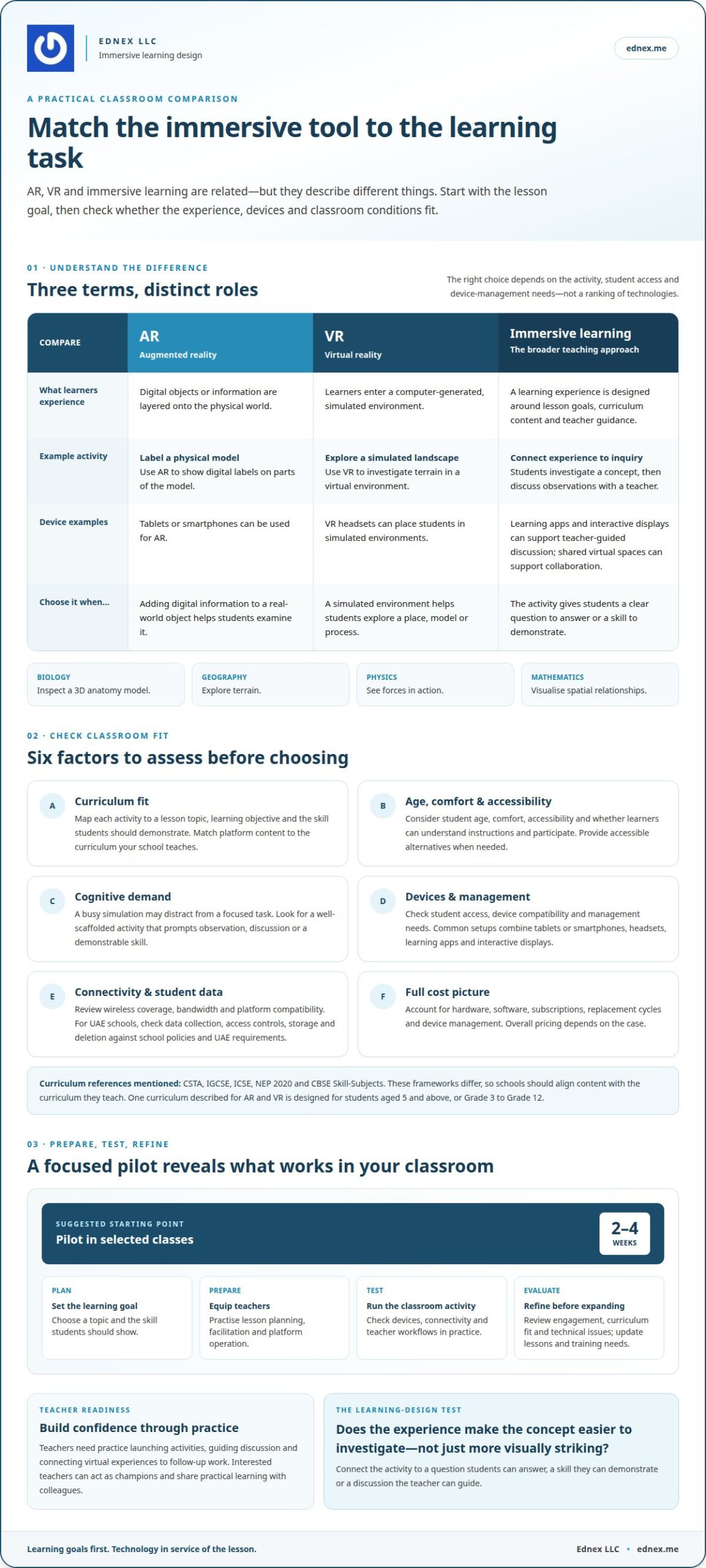
Augmented reality overlays digital content onto the physical world, virtual reality places learners in simulated environments, and immersive learning describes the broader educational approach. Knowing the difference helps schools match tools to tasks. For example, AR can label parts of a physical model, while VR can let students explore a simulated landscape.
In biology, students might inspect a 3D anatomy model; in geography, they could explore terrain. Physics simulations can show forces in action, while interactive mathematical models can help learners visualise spatial relationships. Pairing an activity with an interactive display lets a teacher guide discussion as students examine visual material. The strongest AR VR solutions for classrooms make the concept easier to investigate, not merely more visually striking.
Consider student age, comfort, accessibility and the lesson’s cognitive demands. A busy simulation may distract from a focused task, while a well-scaffolded activity can prompt observation and discussion. Teachers should connect the experience to a question students can answer or a skill they can demonstrate.
Classroom Platforms, Apps, and Devices
Classroom setups commonly combine tablets or smartphones for AR, VR headsets for simulated environments, learning apps and interactive displays. These are common device categories, not a ranking; the right choice depends on the activity, student access and device-management needs. Shared virtual spaces can support collaboration on engineering problems and science investigations.
For UAE schools, review each platform’s student-data collection, access controls, storage and deletion practices against applicable school policies and UAE requirements. Hardware, software, subscriptions, replacement cycles and device management shape overall costs; pricing depends on the case and is provided after a quote request.
Curriculum-aligned content and teacher professional development
Choose virtual reality and augmented learning content based on lesson objectives, curriculum outcomes and assessment. A striking simulation adds little if students can’t connect its concepts to classroom learning.
Start by mapping each activity to a topic and the skill students should demonstrate. For example, a simulation can let learners test a scientific hypothesis, then explain their observations in a teacher-led discussion. Curriculum frameworks named for immersive learning include CSTA, IGCSE, ICSE, NEP 2020 and CBSE Skill-Subjects. These frameworks differ, so UAE schools should align platform content with the curriculum they teach. One curriculum described for AR and VR is designed for students aged 5 and above, or from Grade 3 to Grade 12.
Teacher training should cover lesson planning, classroom facilitation and platform operation. Educators need practice launching activities, guiding discussion and connecting virtual experiences to follow-up work. Identify interested teachers as champions; they can explore the technology and share practical learning with colleagues. This supports consistent classroom use instead of leaving each educator to develop an approach alone.
What teacher training and technical support are needed for classroom AR and VR? Educators need professional development to integrate activities into everyday lessons, while technical support should address platform setup, device compatibility and connectivity. Schools can begin with a 2-4 week pilot in selected classes, then evaluate student engagement, curriculum fit and technical issues before expanding.
Reliable wireless coverage and sufficient bandwidth support smooth activities, while device compatibility affects which lessons run as intended. A pilot can reveal whether the existing network, devices and teacher workflows suit the selected content. Use evaluation findings to refine lesson plans and identify further training needs. Schools extending practical learning through virtual and remote lab learning can connect guided activities with broader learning experiences.
What is a virtual reality classroom?
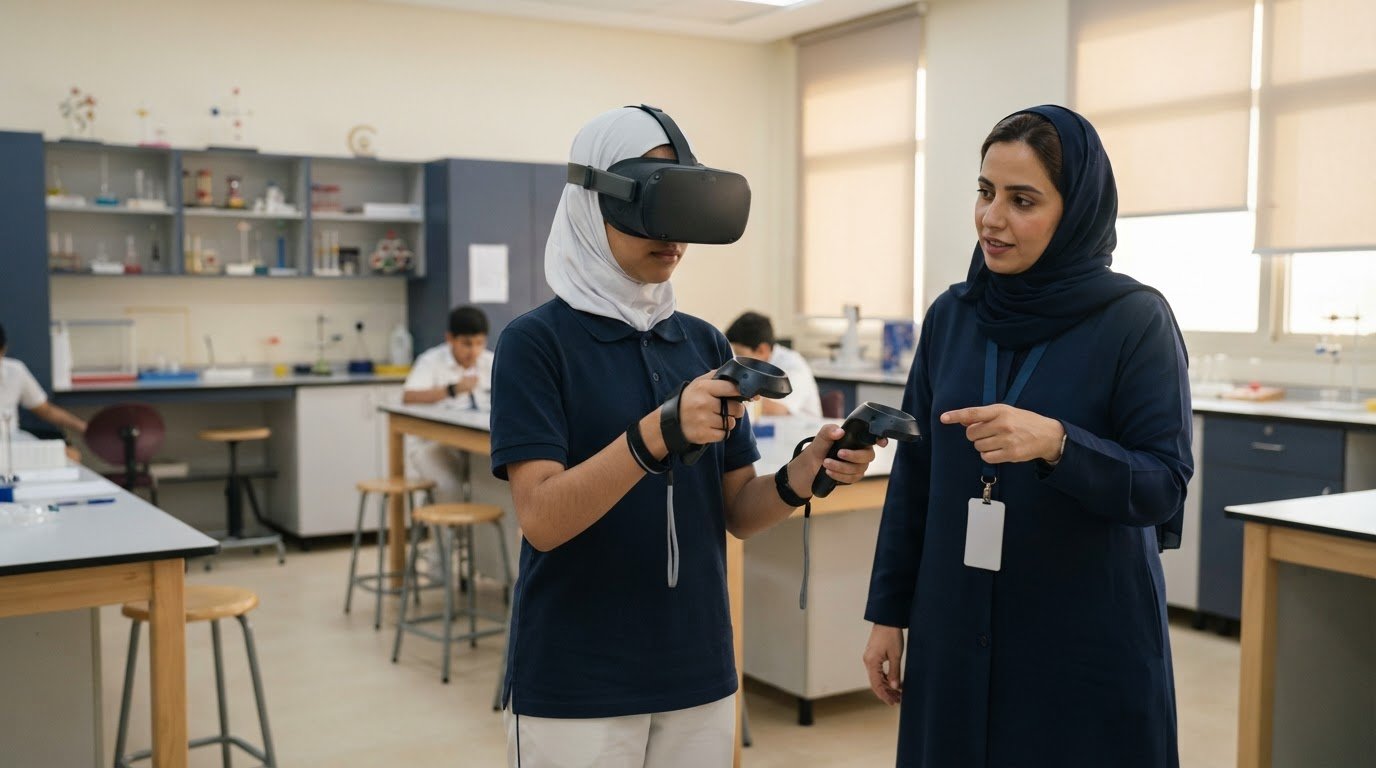
A virtual reality classroom uses headsets and software to place students in computer-generated environments. Instead of only reading about a system, learners can examine a virtual model, interact with objects and take part in teacher-guided activities. The hardware creates the experience; teaching design connects it to learning goals.
Visualization and interaction can make abstract concepts more tangible. A student studying the human body, for example, can inspect a 3D model from different angles. Immersive first-person learning experiences are associated with 25-40% higher knowledge retention than passive content delivery. A separate classroom finding reports that 76% of students have higher motivation in VR-based lessons than in textbook instruction.
Personalised learning can adapt the difficulty of an immersive activity to a student’s progress. In a science simulation, learners might revisit a concept or attempt a more complex task as their understanding develops. Shared virtual spaces also let students collaborate on engineering problems, science investigations and hypotheses. These experiences give teachers opportunities to guide discussion, observe participation and connect discoveries to follow-up work.
Inclusive design starts with the learner, not the headset. Consider whether students can comfortably use the hardware, understand instructions and participate through accessible alternatives when needed. A school’s learning management system can help organise activities alongside lesson materials and assignments if it supports the school’s workflow. Teachers can connect a virtual task to a reflection or assessment in the same course.
What are the risks of classroom AR and VR, including motion sickness, accessibility and screen time? New users may experience motion sickness, while comfort, accessibility and device battery life can limit extended use. Teachers can plan supervised sessions, offer non-headset ways to engage with the same lesson, and balance immersive activities with other classroom learning.
AR/VR use in school classrooms
The main classroom solutions are augmented reality apps on tablets or smartphones, virtual reality experiences through headsets, and shared virtual spaces. Schools use them to make visual learning active, from exploring a historic site to collaborating on a science investigation.
The difference becomes clear in a lesson. With augmented reality, students can view digital content over their physical surroundings, such as a 3D model beside a classroom display. In VR, learners enter a simulated environment, which can bring a distant location or space setting into the school. A teacher can frame either activity with a learning objective, then ask students to explain what they observed.
Classroom use works best when an immersive activity complements, rather than simply replaces, a textbook. Students might explore a virtual environment, record observations and discuss evidence together. A chemistry simulation can let a class examine an experiment before connecting its visual sequence to the underlying concepts. Shared virtual spaces can support teamwork on engineering problems, investigations and hypotheses.
Implementation can start with selected classes or year groups, giving teachers a focused way to assess lesson fit and student access. Some schools use a shared set of 30 headsets across a department. A pilot can also surface practical constraints: device availability, comfort, battery life, connectivity and the need for alternatives for students who cannot use headsets. Cloud-based XR platforms may support device-friendly experiences, while content filtering should be part of deployment planning.
The takeaway is to choose each tool for a learning purpose, not novelty. Use AR when digital visuals should complement the classroom, and VR when a simulated environment adds meaningful context. Then connect the experience to teacher-led discussion and follow-up learning. Schools developing a structured approach can explore classroom AR and VR solutions as part of their immersive learning plans.
Common classroom formats include AR apps on tablets or smartphones, VR experiences through headsets, and collaborative shared virtual spaces.
Ednex: STEAM Programs
Ednex LLC helps schools translate immersive learning goals into broader, hands-on STEAM programmes. Its offerings suit schools planning connected classroom experiences that link digital exploration with practical skills and projects.
Robotics and Coding for schools and Arduino Education can extend learning into programming, design and experimentation. A Future Science Lab Setup can support practical science activities, while STEAM Programs bring disciplines together through applied learning. The right fit depends on the subjects, student needs and educational goals the school wants to address.
For UAE schools shaping an integrated learning plan, these offerings can provide a foundation for connecting classroom concepts with practical exploration. Contact Ednex LLC to discuss your school’s learning goals, or visit ednex.me.
Shape the next stage of classroom learning
A thoughtful plan for AR VR solutions for classrooms begins with a school’s ambitions, then turns them into experiences teachers can use and students can learn from. The opportunity is not simply to introduce new technology. It’s to create a learning environment where exploration, practical application and curriculum goals work together.
Choose a manageable starting point, define what students should gain, and give educators a meaningful role in shaping how immersive tools fit their lessons. As the school learns from the first experience, it can refine its approach and build a stronger foundation for future innovation.
Ednex can discuss how your classroom needs connect with its education offerings. Contact Ednex to discuss your classroom needs and take a considered next step toward more engaging learning experiences.
Frequently Asked Questions
What is AR in education?
AR in education adds interactive digital material to a lesson anchored in the classroom or a real object. For example, students can use a tablet to view labelled components on a physical model, then identify each part during a teacher-led activity. This can make an object’s structure easier to inspect without replacing practical observation, discussion or the teacher’s explanation.
What is augmented reality?
Augmented reality is a digital layer aligned with the user’s view of physical surroundings, not a complete replacement for them. In a classroom, the distinction helps teachers select a suitable format: AR can annotate a printed map or classroom object, while a fully virtual scene suits an activity requiring a simulated location. The device and task should match the learning objective.
How do AR and VR improve student learning and engagement?
AR and VR can engage students by inviting them to interact with lesson material, then explain what their actions show. In a geography exercise, a class might compare terrain features on a model and justify which route crosses a ridge. The teacher can assess reasoning through students’ explanations, not simply whether they enjoyed the activity. Interactive tasks benefit from a clear question to answer.
What equipment and infrastructure are needed to set up AR and VR in a classroom?
A classroom setup typically combines tablets or smartphones for AR, VR headsets for simulated environments, suitable learning software and a teacher display for shared instruction. Schools also need dependable wireless coverage, enough bandwidth for chosen activities, compatible devices, and a plan for charging, storage and access. Before a lesson, test the app on the classroom network and the devices students will use.
Which classroom AR and VR platforms, apps, and devices are most popular?
Common classroom options include tablets or smartphones for AR, VR headsets for simulated environments, learning apps and interactive displays. The right choice depends on the activity, student access and device-management needs.
Related Posts ...

Comments are disabled