


How to Introduce VR to Your School Without a Massive Budget
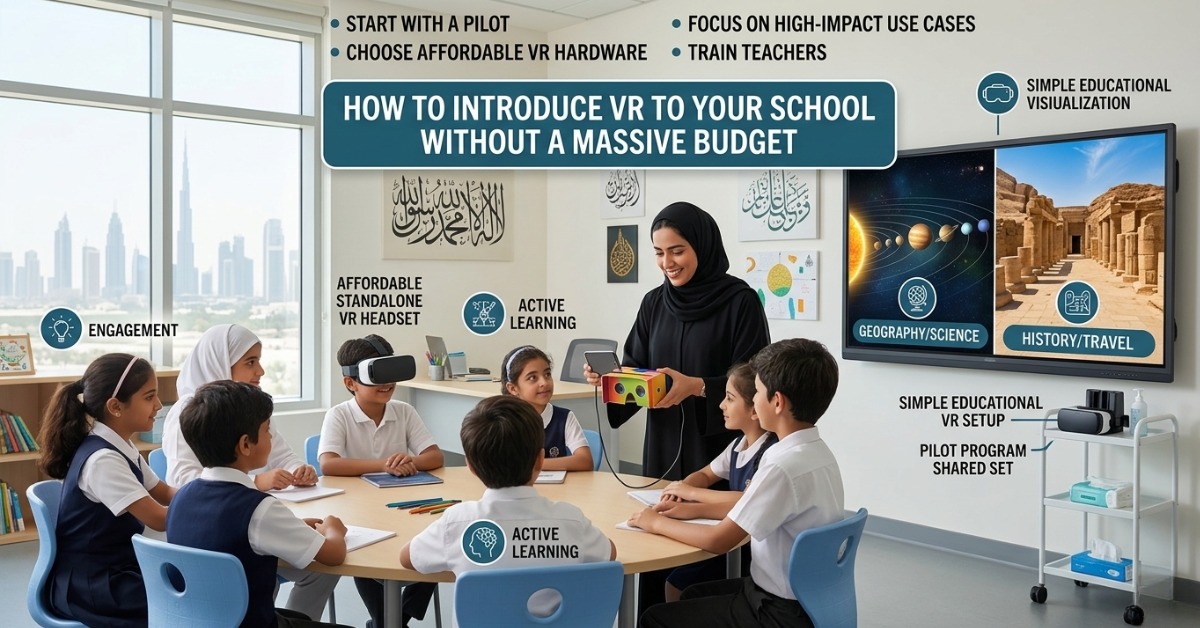
Virtual reality is no longer a luxury reserved for elite institutions with large technology budgets. Today, affordable VR for schools is more realistic than ever, especially for schools that want to improve student engagement, support active learning, and introduce future-ready teaching methods without overspending.
For many school leaders, the idea of VR sounds exciting, but the first thought is often the same: How much will it cost us? That concern is valid. The good news is that VR in education does not need to begin with a full lab, expensive headsets for every student, or a complete curriculum overhaul. In fact, the best approach is often small, simple, and strategic.
If your school is exploring virtual reality for classrooms, this guide will show you how to get started in a practical and budget-conscious way. From choosing the right equipment to planning an effective educational VR setup, here is how to make VR work for your students and teachers without stretching your resources too far.
Why Schools Are Investing in VR
VR creates learning experiences that feel immediate, immersive, and memorable. Instead of only reading about a historical site, students can explore it. Instead of looking at a diagram of the solar system, they can move through it. That is the power of VR.
Schools are adopting VR because it can help:
- Increase student engagement
- Support visual and experiential learners
- Make abstract ideas easier to understand
- Improve retention through interactive experiences
- Introduce students to modern digital tools
- Enrich STEM, science, geography, history, and language lessons
For schools in the UAE and GCC, VR also supports broader educational goals around innovation, digital transformation, and future-focused learning. It can be especially useful for institutions that want to stand out while still managing costs carefully.
Start With a Clear Goal, Not With the Hardware
This is one of the most important tips when planning affordable VR for schools. Do not begin by shopping for devices. Start by asking what problem you want VR to solve.
For example, your school may want to:
- Make science lessons more interactive
- Improve student motivation in middle school classes
- Offer immersive language learning experiences
- Support STEM programs with hands-on exploration
- Create memorable learning experiences during special projects
When your goal is clear, it becomes much easier to choose the right tools and avoid overspending. A school that wants to enrich one subject area does not need the same investment as a school building a full innovation lab.
Begin With a Small Pilot Program
One of the smartest budget VR solutions for schools is to start with a pilot. This keeps initial costs low and gives your team time to learn what works.
A pilot program might include:
- One classroom or one grade level
- A small set of VR headsets
- A limited number of lessons or subjects
- A short trial period, such as one term
- A simple review process for teacher and student feedback
This approach reduces risk and helps school leaders make informed decisions before expanding. It also gives teachers confidence. That matters more than people think! Even the best technology can fail if staff feel overwhelmed.
Choose Budget-Friendly VR Hardware
You do not need premium devices to bring virtual reality for classrooms into your school. There are now several cost-effective options available, depending on your learning goals.
Low-cost options to consider:
- Standalone entry-level VR headsets
These are often easier to manage than complex PC-based systems. They require less setup and can be moved between classrooms. - Shared headset model
Instead of buying one device per student, schools can rotate a smaller number of headsets during lessons or group work. - Mobile-based VR viewers
For very limited budgets, smartphone-compatible viewers may be a simple entry point for basic immersive experiences. - Classroom bundle purchases
Some education technology providers offer discounted school packages, which can lower per-unit costs.
When comparing hardware, look at:
- Ease of use
- Device durability
- Available educational content
- Teacher controls
- Warranty and support
- Hygiene and storage needs
For many schools, the best first step is not the most advanced headset. It is the one your teachers can actually use with confidence.
Focus on High-Impact Use Cases
A common mistake is trying to use VR everywhere. A better strategy is to use it where it adds real value.
Here are some high-impact areas for VR in education:
Science
- Explore the human body in 3D
- Simulate lab experiences safely
- Visualize molecules, cells, and ecosystems
Geography
- Visit landmarks, deserts, oceans, and cities
- Understand natural environments and climate zones
- Compare regions around the world
History
- Recreate ancient civilizations
- Tour historical landmarks
- Bring key events to life in a more memorable way
Language Learning
- Practice language in simulated real-life settings
- Build confidence through immersive scenarios
- Add context to vocabulary and cultural learning
Career and Technical Education
- Introduce workplace simulations
- Explore engineering and design concepts
- Support technical training through guided practice
By focusing on a few strong use cases, schools can show measurable value early and justify future expansion.
Use Free and Low-Cost Educational Content
A strong educational VR setup is not just about devices. Content matters just as much. Thankfully, schools can find many free or affordable VR experiences that work well in class.
Look for content that is:
- Curriculum-aligned
- Age-appropriate
- Easy for teachers to guide
- Simple to access and repeat
- Available across multiple subjects
Some providers offer educational libraries or subscription models. Before paying for a large content package, test a few lessons first. Ask teachers which experiences truly support learning outcomes instead of simply entertaining students.
That balance is important. Students love immersive technology, of course, but schools need experiences that support real teaching goals.
Train Teachers in Simple, Practical Ways
If you are wondering how to use VR in schools successfully, the answer is not just equipment. It is teacher readiness.
Teachers do not need to become technical experts. They just need practical support, clear lesson ideas, and a low-pressure introduction.
Helpful teacher training steps:
- Start with a short hands-on demonstration
- Show 2–3 classroom-ready lesson examples
- Provide simple setup and safety guidelines
- Create a shared checklist for using the devices
- Allow teachers to test VR before using it with students
- Assign one staff member as the internal VR champion
Training works best when it is practical and relevant. A short, focused workshop is often more useful than a long technical session.
Build a Simple Rollout Plan
A low-cost VR strategy needs structure. Without a plan, even a small investment can feel chaotic.
Your rollout plan should include:
- The educational goal
- The target year group or subject
- Number of devices needed
- Content or apps to be used
- Teacher training schedule
- Storage and charging process
- Cleaning and student safety procedures
- Timeline for review and expansion
This kind of planning helps schools use their budget wisely. It also makes it easier to communicate the value of the project to leadership teams, parents, and other stakeholders.
Keep Costs Low With Smart Operational Choices
There are many ways to make budget VR solutions for schools more sustainable over time.
Cost-saving ideas:
- Buy a small number of shared devices first
- Introduce VR in phases instead of school-wide
- Use multi-subject content to increase usage
- Choose durable devices with easy management tools
- Reuse VR across enrichment programs and events
- Partner with local education technology providers for support
- Bundle training, content, and devices when possible
Schools in the Middle East can also benefit from working with regional providers who understand local curriculum needs, school workflows, and procurement processes. That local understanding can save both time and money.
Measure Results Before Scaling
Once your pilot is running, track what happens. This step is often skipped, but it makes a huge difference.
Measure things like:
- Student engagement
- Teacher confidence
- Lesson participation
- Curriculum relevance
- Ease of classroom management
- Frequency of VR use
- Feedback from students and staff
You do not need a complex evaluation model. Even short surveys and teacher observations can help you decide whether to expand, adjust, or refine your VR strategy.
When schools can show positive outcomes, it becomes much easier to build support for future investment.
Common Mistakes to Avoid
When introducing affordable VR for schools, watch out for these common issues:
- Buying hardware before defining learning goals
- Starting too big too quickly
- Ignoring teacher training
- Choosing content with little curriculum value
- Underestimating storage, charging, and cleaning needs
- Failing to gather feedback after the pilot
- Treating VR as a one-time novelty instead of a learning tool
A thoughtful, gradual approach nearly always works better than a fast, expensive rollout.
A Realistic Path Forward for Schools
The idea of bringing virtual reality for classrooms into your school may sound ambitious, but it does not have to be overwhelming. Start with one goal, one pilot, and one group of teachers who are open to trying something new. That is often how the best innovation begins.
With the right plan, VR in education can be both impactful and practical. Schools do not need a massive budget to create immersive learning experiences. They need clear priorities, smart purchasing decisions, and a focus on educational value.
If you have been exploring how to use VR in schools, the best time to begin may be sooner than you think. A small, well-managed launch can open the door to more engaging lessons, better student experiences, and a stronger culture of innovation across your campus.
FAQ
1. What is the most affordable way to introduce VR in a school?
The most affordable way is to start with a small pilot using shared headsets, free or low-cost educational content, and a limited number of classrooms. This approach lowers risk and helps schools test value before scaling.
2. Is VR in education only suitable for private schools with large budgets?
No. Many public and private schools can adopt affordable VR for schools by starting small, using budget-friendly hardware, and focusing on subjects where VR adds the most value.
3. What subjects work best with virtual reality for classrooms?
Science, geography, history, language learning, and STEM subjects often see strong results. VR works best when it helps students experience concepts that are difficult to show through textbooks alone.
4. How many VR headsets does a school need to start?
A school does not need a full class set to begin. Many schools start with a small shared set that students use in rotation during guided activities.
5. What should be included in an educational VR setup?
A basic educational VR setup should include headsets, selected learning content, charging and storage solutions, cleaning materials, teacher guidance, and simple classroom procedures.
6. How can schools in the UAE and GCC implement VR cost-effectively?
Schools in the UAE and GCC can keep costs under control by choosing phased rollout plans, working with regional education technology providers, aligning content with learning goals, and training teachers before expanding usage.
Author Bio
Ednex is a trusted education solutions brand focused on helping schools adopt practical, future-ready learning tools. With a strong understanding of innovation in teaching and learning, Ednex supports schools in building effective technology strategies that improve engagement, enrich classroom experiences, and deliver lasting value.
Related Posts ...
Comments are disabled