


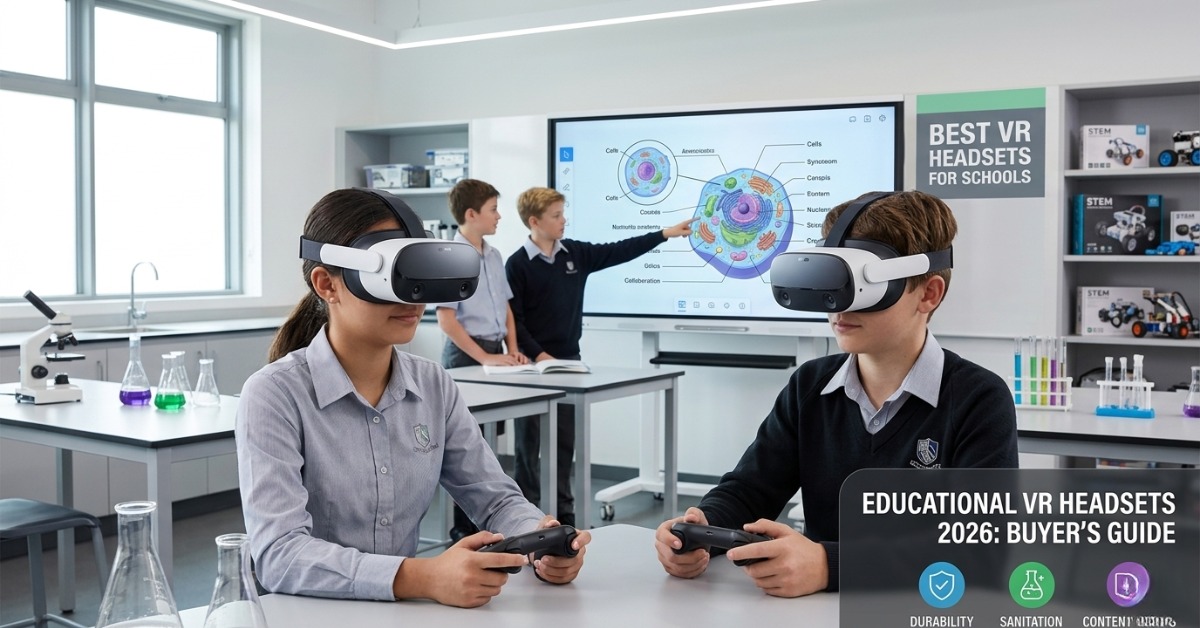
Best VR Headsets for Schools in 2026: A Buyer’s Guide
Schools are no longer asking whether immersive technology has a place in learning. The real question is which device makes sense for daily use, shared environments, tight budgets, and real teaching outcomes. Choosing the best VR headsets for schools in 2026 means looking beyond flashy demos. You need hardware that is durable, easy to manage, safe for students, and backed by strong content.
By the end of this guide, you’ll be able to compare headset types, evaluate the right buying criteria, and narrow down the best options for your campus. We’ll cover what has changed in educational VR headsets 2026, what features matter most for schools, and which models are best suited for classroom learning, STEM labs, and shared media spaces.
For many school leaders, the goal is simple: find VR learning solutions for schools that teachers will actually use. That takes a smart balance of content, comfort, maintenance, and long-term value.
Why VR matters more in schools in 2026
Virtual reality has moved from pilot projects to practical classroom use. In 2026, schools are using VR for science simulations, virtual field trips, language immersion, technical training, and collaborative design tasks. The technology is better, lighter, and easier to manage than it was just a few years ago.
What makes virtual reality for classrooms more useful now is not just the headset. It is the full ecosystem around it:
- Better device management for IT teams
- Larger education content libraries
- Improved battery performance
- Easier sanitation for shared use
- More teacher-friendly classroom controls
- Stronger mixed reality and spatial learning tools
This matters because schools do not buy VR for entertainment. They buy it to improve engagement, deepen understanding, and create hands-on learning experiences that are hard to replicate with flat screens.
Quick takeaway: In 2026, the best school VR purchase is not the most advanced headset. It is the one your teachers can deploy consistently and your students can use safely.
What schools should look for before buying
Before comparing brands, it helps to define the buying criteria. Many schools make the mistake of focusing only on image quality or headline features. In practice, the best VR headsets for education succeed because they are manageable, comfortable, and reliable across repeated classroom use.
1. Durability for daily school use
Student devices get handled often. They move between classrooms, labs, and storage carts. That means school VR hardware must be built for frequent use, not occasional demos.
Look for:
- Strong adjustable straps
- Replaceable face cushions
- Scratch-resistant lenses or good lens protection
- Solid controller build quality
- Protective storage and charging options
- Commercial or education-grade support plans
If a headset feels fragile in a demo, it will not hold up well in a school setting.
2. Battery life and charging workflow
Battery life affects lesson planning more than many buyers expect. A headset may sound impressive on paper, but if it cannot make it through multiple sessions, it creates friction for staff.
Ideal battery planning should include:
- At least 2 to 3 hours of active classroom use
- Fast recharge time
- Charging dock or cart compatibility
- Clear battery status visibility for staff
- Optional swappable battery support where available
For shared deployment, charging workflow is often as important as battery size.
3. Sanitation and hygiene
Because school headsets are shared, sanitation is not optional. This is one of the most important areas in any 2026 buyer’s guide.
Schools should prioritize:
- Wipeable facial interfaces
- Removable and replaceable cushions
- Silicone or medical-grade covers
- Easy-to-clean controller surfaces
- Good ventilation to reduce moisture buildup
A headset with excellent visuals but poor hygiene design can quickly become difficult to use at scale.
4. Content library and curriculum fit
The hardware is only part of the investment. Strong content is what makes VR learning solutions for schools valuable in day-to-day teaching.
Ask these questions:
- Does the headset support leading education platforms?
- Are there science, history, geography, language, and STEM apps available?
- Can teachers launch guided experiences quickly?
- Is there age-appropriate content for your student groups?
- Can students create, not just consume, VR experiences?
The best headset for your school is often the one with the best content fit, not the strongest raw specs.
5. Device management and classroom control
For schools buying multiple units, centralized management matters. IT teams need ways to update apps, monitor devices, and control access without touching every headset one by one.
Key management features include:
- Fleet setup and bulk provisioning
- Remote app deployment
- Kiosk or single-app mode
- Usage restrictions and student safety controls
- Analytics or session monitoring
- Integration with school IT policies
Mini-summary: A school-ready VR headset should be durable, easy to sanitize, long enough on battery, supported by quality content, and manageable across multiple users.
Types of VR headsets schools will consider in 2026
Not all headsets serve the same purpose. Most schools will compare three main categories.
Standalone VR headsets
These devices run without a connected PC. They are the most common choice for education because they are easy to deploy and move between rooms.
Best for:
- General classroom use
- Shared carts and mobile labs
- Virtual field trips
- Teacher-led group activities
PC-connected VR headsets
These headsets rely on a connected computer for performance. They are less portable but can support more demanding simulations and design software.
Best for:
- Engineering and technical training
- Advanced STEM labs
- Architecture and 3D modeling
- Specialized career pathways
Mixed reality headsets
These devices blend digital content with the physical world. They can be powerful for spatial learning, design, and guided instruction, though they often come at a higher cost.
Best for:
- Innovation labs
- Medical and technical programs
- Collaborative spatial tasks
- Future-facing pilot programs
For most K–12 buyers, standalone models remain the leading choice among the best VR devices for students because they are simpler to manage and more budget-friendly.
Best VR headsets for schools in 2026: top models to compare
Below are the main types of headsets schools should shortlist in 2026. Exact model availability may vary by region and supplier, but these categories reflect the strongest options in the market.
1. Meta Quest education-focused deployments
Meta’s standalone ecosystem remains one of the strongest options for schools due to app availability, usability, and broad developer support. Education deployments often benefit from a mature content marketplace and relatively easy onboarding.
Best for
- General classroom use
- Middle and secondary schools
- STEM and interactive lessons
- Virtual field trips
Key strengths
- Strong standalone performance
- Broad app ecosystem
- Good hand tracking and controller support
- Familiar user experience
- Suitable for many classroom scenarios
Points to evaluate
- Education licensing and management setup
- Access controls for student use
- Shared-device sanitation workflow
- Battery support for full-day rotation
Typical technical highlights
- Standalone operation
- High-resolution display
- Inside-out tracking
- Wireless use
- Optional charging dock ecosystem
This is often the most practical choice when schools want flexible VR headsets for education without building a full PC-based lab.
2. Pico enterprise and education-ready headsets
Pico remains a strong contender for institutional use, especially where schools want enterprise management features and a focused standalone experience.
Best for
- Schools needing tighter fleet control
- Multi-headset deployments
- Classroom and lab use
- Regional buyers seeking alternatives to mainstream consumer ecosystems
Key strengths
- Good enterprise management tools
- Comfortable fit for longer sessions
- Competitive display quality
- Suitable for shared school environments
Points to evaluate
- Local content access and platform support
- Regional distribution and after-sales service
- Compatibility with your preferred education apps
Typical technical highlights
- Standalone headset design
- Enterprise device management
- High refresh display
- Room-scale tracking
- School-friendly deployment options
For administrators, Pico can be appealing when management and institutional control are high priorities.
3. HTC Vive-focused education and lab solutions
HTC Vive devices continue to serve schools that need stronger technical simulations, high-end interaction, or mixed deployment models that combine standalone and PC-powered workflows.
Best for
- Technical education
- Advanced secondary labs
- Career pathways and simulation training
- Design, engineering, and immersive creation
Key strengths
- Strong tracking quality
- Flexible ecosystem options
- Solid reputation in professional VR
- Good fit for specialized labs
Points to evaluate
- Higher total cost of ownership
- More complex setup in some cases
- Need for stronger IT support if PC-tethered
Typical technical highlights
- Standalone or PC-connected options
- High-fidelity visuals
- Precise tracking
- Business and enterprise deployment tools
- Broad simulation potential
This category is often better for specialized programs than for whole-school general classroom rollout.
4. ClassVR-style education-first platforms
Education-first platforms that bundle hardware, content, and teacher controls still have a strong place in schools. These systems may not always win on raw specs, but they often perform well in teaching practicality.
Best for
- Primary and middle schools
- Teachers new to VR
- Schools wanting pre-curated content
- Easier implementation with less IT burden
Key strengths
- Designed for school use from the start
- Teacher controls and guided delivery
- Curriculum-linked content
- Simpler onboarding process
Points to evaluate
- Less flexibility than open ecosystems
- Content model and subscription costs
- Whether the hardware specs match your future needs
Typical technical highlights
- Classroom management tools
- Curated educational content
- Shared-use design
- Simplified deployment model
- Student-friendly controls
For many buyers, this is one of the safest entry points into virtual reality for classrooms.
How to choose the right headset for your school
The right choice depends on your school’s teaching goals, staff readiness, and deployment model.
Choose a standalone headset if:
- You want easy rollout
- You need mobility between rooms
- Your main use case is general teaching
- You want lower setup complexity
Choose a PC-powered or premium lab model if:
- You run technical simulations
- You need advanced 3D workflows
- You have strong IT support
- You are building a specialist lab, not a shared cart
Choose an education platform bundle if:
- You want teacher-ready content
- You need simple classroom management
- You are starting with a pilot
- You want lower training demands
A useful buying filter is this: if teachers cannot launch a lesson in minutes, the device may be too complex for wide adoption.
Common mistakes schools make when buying VR
Even good budgets can lead to poor decisions if schools skip the planning stage.
Common mistakes
- Buying for novelty instead of curriculum use
- Ignoring sanitation requirements
- Underestimating storage and charging needs
- Choosing devices without teacher training support
- Focusing only on headset cost, not total ownership cost
- Overlooking content licensing and renewals
- Buying advanced hardware with no classroom workflow plan
Mini-summary: Schools get better results when they buy for implementation, not just specification.
A simple buying checklist for 2026
Use this checklist before making a final decision on the best VR headsets for schools:
- Does the headset fit your age group and supervision model?
- Can it survive shared use across the school year?
- Is battery life enough for real lesson blocks?
- Is sanitation fast and practical?
- Does it support the content your teachers need?
- Can your IT team manage multiple devices easily?
- Are teacher controls available?
- What is the full cost including cases, charging, licenses, and training?
- Can the solution scale if your pilot succeeds?
Final thoughts
The best VR headsets for schools in 2026 are the ones that help students learn without creating extra friction for teachers and IT teams. That usually means choosing devices with strong classroom practicality, easy cleaning, reliable content access, and manageable deployment.
For many schools, standalone systems will continue to offer the best balance of performance and simplicity. For specialist labs, premium or PC-connected devices may be the better fit. And for schools just getting started, education-first platforms can reduce risk and speed up adoption.
The smartest next step is to shortlist two or three options, map them against your teaching goals, and test them in a real classroom workflow. That approach gives you a better buying decision than specs alone ever will.
If you are planning immersive learning for your campus, use this guide as your starting checklist so your investment supports teaching from day one.
FAQ
What are the best VR headsets for schools in 2026?
The best options usually fall into three groups: standalone headsets for general classroom use, PC-powered headsets for advanced labs, and education-specific platforms with built-in teacher controls. The right choice depends on your budget, content needs, and deployment plan.
Are VR headsets safe for classroom use?
Yes, when schools use age-appropriate content, follow session time guidelines, supervise students, and maintain proper hygiene. Comfort, fit, and clear usage rules are important.
How many VR headsets does a school need to start?
Many schools begin with a pilot set of 5 to 10 devices or even a smaller cart for one department. Starting small helps staff build confidence before scaling.
What subjects benefit most from VR in schools?
Science, history, geography, language learning, art, design, engineering, and career education all benefit from immersive learning. VR works best where visualization and experience improve understanding.
What makes educational VR headsets 2026 better than earlier models?
Newer devices usually offer better displays, lighter designs, longer battery life, improved management tools, and stronger content support for education.
Do schools need special software with VR headsets?
Usually yes. The headset is only one part of the solution. Schools often need education apps, classroom management tools, content subscriptions, and device management platforms.
How should schools clean shared VR headsets?
Use wipeable interfaces, replaceable covers, and approved cleaning materials between sessions. Headsets designed for shared use make sanitation much easier.
What is the difference between consumer VR and school VR deployment?
Consumer VR focuses on individual use. School deployment requires shared-device hygiene, classroom controls, fleet management, durable accessories, and curriculum-ready content.
Author Bio: Ednex
Ednex is a future-ready learning solutions brand that helps schools build practical, scalable technology environments for modern education. From immersive learning and STEM spaces to classroom innovation planning, Ednex supports institutions with solutions designed for real teaching impact, long-term usability, and student-centered growth.
Related Posts ...



Comments are disabled