




Benefits of Using PC Oscilloscopes in STEM Labs
Integrating PC oscilloscopes in STEM labs transforms how students visualize and understand complex electronic signals. By connecting advanced measurement hardware directly to standard classroom computers, educators provide a highly interactive learning experience. This guide explores the massive advantages of upgrading to digital laboratory instruments.
Schools need modern, accessible tools to make practical electronics education effective. A digital oscilloscope for STEM labs replaces bulky, expensive traditional units with sleek, software-driven solutions. Without these adaptable tools, students often struggle to grasp abstract electrical engineering concepts.
Read on to discover what makes these devices essential, how they compare to traditional models, and why they are revolutionizing the modern classroom.
What is a PC Oscilloscope?
A PC oscilloscope is a compact digital measurement device that uses a computer screen to display, analyze, and store electronic waveforms. Instead of relying on a built-in monitor and physical knobs, it connects via USB to a desktop or laptop. The computer’s processor handles the heavy lifting of signal rendering and data management.
This setup makes it an ideal oscilloscope for students who are already familiar with navigating PC software. The hardware box captures the raw electrical signals, while the dedicated software application translates that data into readable graphs. This division of labor keeps the hardware costs incredibly low.
Key features of a standard PC oscilloscope include:
- USB connectivity: Draws power and transfers data through a single standard computer cable.
- Software-driven interface: Uses a mouse and keyboard to adjust timebases, triggers, and voltage scales.
- Compact form factor: Fits easily into a backpack or small storage bin, saving valuable desk space.
- High-resolution displays: Leverages the school’s existing high-definition computer monitors for massive, clear waveforms.
Importance of Oscilloscopes in STEM Education
Oscilloscopes are the foundational diagnostic tool of all modern electrical engineering and physics education. They allow students to literally see invisible electrical currents as they fluctuate over time. Understanding how to read these waveforms is mandatory for anyone pursuing a career in hardware development or robotics.
Providing a reliable digital oscilloscope for STEM labs bridges the gap between mathematical theory and physical reality. When students calculate a voltage drop on paper, the oscilloscope proves their math is correct by displaying the exact electrical curve.
Reasons oscilloscopes are vital for classrooms:
- Signal visualization: Turns abstract concepts like alternating current (AC) into visible, measurable sine waves.
- Fault finding: Teaches students how to troubleshoot broken circuits by tracing where the signal stops.
- Timing analysis: Allows learners to measure the precise speed of digital communication between microcontrollers.
- Component behavior: Demonstrates exactly how capacitors charge and discharge in real-time.
Key Benefits of Using PC Oscilloscopes in STEM Labs
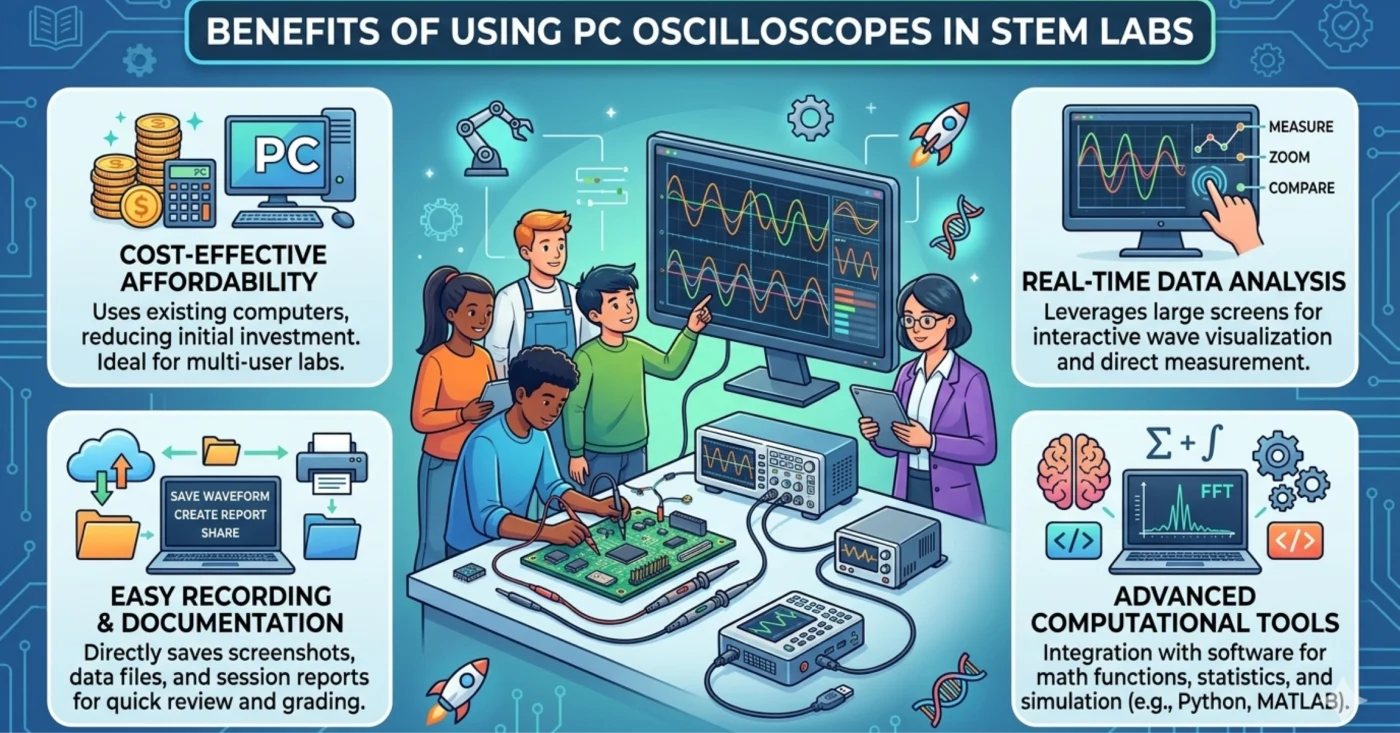
The primary benefits of using PC oscilloscopes in STEM labs include drastically lower costs, massive display screens, and effortless data sharing. Traditional oscilloscopes require schools to buy a screen, processor, and measurement hardware all in one box. PC oscilloscopes utilize the computers schools already own, cutting costs by more than half.
This affordability allows schools to achieve a true 1:1 student-to-device ratio for practical electronics education. When every student has their own measurement tool, hands-on engagement and comprehension skyrocket.
Top advantages for educational institutions:
- Unmatched affordability: Costs a fraction of the price of traditional benchtop units with similar bandwidth.
- Easy screenshots and reporting: Students can instantly save waveform images directly to their hard drive for lab reports.
- Familiar user interface: Software mimics the programs students already use, reducing the learning curve.
- Free software updates: Manufacturers continuously improve the interface and add new measurement features via free downloads.
- Large, clear visuals: Viewing a complex signal on a 24-inch monitor is vastly superior to squinting at a 7-inch built-in screen.
PC Oscilloscope vs Traditional Oscilloscope
The main difference between PC and traditional oscilloscopes lies in data processing and user interface design. Traditional benchtop oscilloscopes are standalone units with physical knobs, integrated screens, and internal processors. PC oscilloscopes rely entirely on an external computer to display and analyze the captured data.
While traditional units are excellent for industrial environments, a PC oscilloscope is vastly superior for classroom collaboration. Students can easily share their screens with the teacher’s smartboard, making group instruction highly effective.
Key comparisons between the two formats:
- Cost of ownership: PC oscilloscopes are significantly cheaper because they lack built-in screens and processors.
- Portability: PC models are small enough to fit in a pocket, whereas traditional units are bulky and heavy.
- Upgradability: PC software is updated easily online; traditional firmware updates are often cumbersome.
- Tactile feedback: Traditional models offer physical knobs that some engineers prefer for rapid adjustments, though many PC models now offer USB knob accessories.
Applications of PC Oscilloscopes in STEM Learning
PC oscilloscopes are used in STEM labs to analyze audio frequencies, debug robotics sensors, and test basic circuit designs. Because the software is so versatile, teachers can use a single device across physics, computer science, and engineering classes. This cross-curricular utility makes them an incredible investment.
Integrating PC oscilloscopes in STEM labs allows students to conduct professional-grade experiments. They can measure the pulse-width modulation (PWM) signals that control robot motors or analyze the frequency of a tuning fork.
Popular classroom applications include:
- Audio analysis: Capturing the sound waves from a microphone to study frequency, amplitude, and pitch.
- Digital logic testing: Decoding serial communication protocols (like I2C or SPI) between Arduino boards.
- Power supply filtering: Observing how capacitors smooth out AC ripples to create steady DC voltage.
- Sensor calibration: Measuring the exact analog voltage output of temperature and light sensors.
How PC Oscilloscopes Enhance Hands-On Learning
By removing the intimidating wall of physical knobs found on traditional units, PC oscilloscopes make signal analysis highly approachable. The software interface usually features intuitive drop-down menus, clear icons, and auto-setup buttons. This design prevents students from getting frustrated by the tool itself.
Effective practical electronics education requires tools that encourage experimentation rather than fear of breaking expensive equipment. Because the hardware is rugged and the software is forgiving, students feel empowered to explore complex circuits independently.
Ways these tools boost hands-on engagement:
- Interactive cursors: Students use their mouse to drag measurement lines across the waveform to instantly calculate frequency and voltage.
- Customizable views: Learners can change colors, zoom in infinitely, and layer multiple signals on top of each other.
- Reference waveforms: Teachers can save a “perfect” signal to the software, allowing students to overlay and compare their own results.
- Data logging: Students can record slow-moving signals over several hours to observe battery discharge rates.
Choosing the Right PC Oscilloscope for School Labs
Selecting the best PC oscilloscope for education requires balancing bandwidth, sample rate, software compatibility, and physical durability. Schools do not need the ultra-high frequencies required by aerospace engineers. A device with 20 MHz to 50 MHz bandwidth is more than sufficient for 99% of high school and undergraduate STEM projects.
When purchasing a digital oscilloscope for STEM labs, the quality of the computer software is just as important as the hardware. Always download and test the manufacturer’s software in “demo mode” before committing to a purchase.
Essential purchasing criteria:
- Bandwidth: Aim for at least 20 MHz to adequately capture fast microcontroller signals.
- Cross-platform software: Ensure the application runs seamlessly on Windows, Mac, and Linux depending on your school’s IT infrastructure.
- Built-in signal generator: Some models include an arbitrary waveform generator (AWG), eliminating the need to buy a separate device.
- Over-voltage protection: Look for hardware that can withstand accidental high-voltage connections without frying the internal circuits.
Challenges and Considerations
The primary challenges of using PC oscilloscopes include managing software installations across school networks and ensuring computer availability. Because the device requires a PC to function, labs must have dedicated computers for every workstation. Furthermore, school IT departments must approve and install the required drivers.
While PC oscilloscopes in STEM labs save money, they do introduce a layer of digital troubleshooting. If a computer crashes or a USB port fails, the student completely loses their ability to measure signals.
Common challenges and practical solutions:
- IT restrictions: Work closely with network administrators to ensure the oscilloscope software has proper permissions to run.
- Desk clutter: While the device is small, managing the USB cable, probe wires, and a computer mouse can crowd a small desk.
- Screen distractions: Using a computer for measurement opens the door for students to get distracted by the internet.
- Hardware protection: Purchase rubberized cases to protect the units from being knocked off lab benches.
Future of Digital Measurement Tools in STEM Labs
The future of STEM measurement tools involves cloud-based data sharing, wireless oscilloscopes, and AI-assisted signal analysis. As educational technology evolves, the physical wires connecting the probe to the computer will disappear. This will allow students to measure circuits safely from across the room.
Looking ahead, practical electronics education will heavily rely on remote and hybrid learning environments. Students will be able to connect their home computers to a PC oscilloscope located physically inside the school lab via cloud servers.
Emerging trends to watch:
- Wi-Fi connectivity: Oscilloscopes that transmit data directly to student iPads and laptops without USB cables.
- AI auto-configuration: Software that instantly recognizes the type of signal and perfectly adjusts the scales without user input.
- Browser-based software: Eliminating the need to install apps by running the oscilloscope interface entirely within a web browser.
- Integrated digital twins: Software that compares the real-world physical signal against a simulated virtual circuit in real-time.
Conclusion
Adopting PC oscilloscopes in STEM labs fundamentally modernizes how students learn electronics, physics, and engineering. These digital tools offer unmatched affordability, massive visual clarity, and a software-driven experience that resonates with modern learners. They remove the barriers to entry that have historically made electrical engineering intimidating.
By investing in a high-quality digital oscilloscope for STEM labs, educational institutions prioritize hands-on, interactive discovery. Students transition from passively reading about voltage in textbooks to actively analyzing and manipulating complex data on their screens. Equip your classrooms with these versatile tools today to build the confident, capable engineers of tomorrow.
Transform Your STEM Labs Today
Are you ready to equip your students with industry-leading digital measurement tools? Ednex specializes in supplying top-tier PC oscilloscopes and complete lab setups for educational institutions across the GCC region, including the UAE, Saudi Arabia, and Qatar.
We provide end-to-end technology solutions from hardware procurement to software integration and comprehensive teacher training. Partner with Ednex today to build a state-of-the-art electronics lab that inspires future engineers and contact our GCC team for a free consultation!
Frequently Asked Questions (FAQ)
What is the main advantage of a PC oscilloscope for students?
The main advantage is the familiar, computer-based user interface and large display screen. Students can easily navigate the software using a mouse, capture screenshots instantly for lab reports, and view complex signals clearly on a large computer monitor.
Are PC oscilloscopes accurate enough for school STEM labs?
Yes, modern PC oscilloscopes offer incredible accuracy that far exceeds the requirements of K-12 and undergraduate education. Devices with 20 MHz to 50 MHz bandwidth can easily analyze audio frequencies, digital logic, and basic microcontroller signals.
Do PC oscilloscopes require special computers to run?
No, almost any modern Windows, Mac, or Linux computer can easily run oscilloscope software. The processing power required to render the waveforms is relatively low, meaning standard classroom laptops or desktops are perfectly suitable.
How do PC oscilloscopes improve practical electronics education?
They make hands-on experimentation highly accessible and cost-effective. Because they are significantly cheaper than traditional units, schools can buy more of them, allowing every student to have direct, hands-on time analyzing their own circuits.
Author Bio:
Ednex is a premier educational technology and curriculum solutions provider dedicated to transforming STEM learning environments. By equipping institutions with world-class digital laboratory instruments, modern oscilloscopes, and expert faculty training, Ednex prepares students across the globe to lead the future of electrical engineering and applied sciences.
Related Posts ...

Comments are disabled